Registering to Visit With the IKNOW App
IKNOW is the free official app for booking an IKN visit. Download it, register an account, pick your date, and show your digital ticket to the liaison officer (LO) at the gathering point.
IKNOW is the Otorita IKN (OIKN)'s official, free app for anyone wanting to visit Nusantara. It's available on both the Play Store and the App Store.
Step by step
- Download the IKNOW app and create an account.
- Log in and select "Kunjungi Nusantara" (Visit Nusantara).
- Choose your visit date and time slot.
- Select the type of visit you're registering for.
- You'll receive a digital ticket with a barcode tied to your registration.
At the gathering point
Bring your phone (or a printout) with your IKNOW barcode to the gathering point, either Rest Area IKN or Simpang Trunen. A liaison officer (LO) checks your registration there before you're allowed onto the visit route. Once checked in, you're free to walk around the areas open to visitors at your own pace, you're no longer escorted step by step for the whole visit.
If something goes wrong
The IKNOW app includes a panic button feature for emergencies during your visit. For general app issues, OIKN has listed a support number: 0821-4437-6300.
Keep in mind
As of May 2026, the Otorita IKN spokesperson said visitors do not need to register in IKNOW, but the app is still recommended for information and its emergency button. We found no newer statement. If the app or staff ask you to register, follow the steps above.
Download the app before you travel. IKNOW support: 0821-4437-6300.
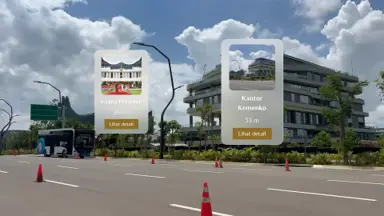
Are you in IKN? Explore Nusantara in AR
NewPoint your phone's camera and discover locations around you in real time, complete with live distance and direction.